
Download GSpot – codec analyzer, video file checker, media compatibility tool, video codec identification, file integrity tester
Overview
GSpot is a dedicated utility designed to assist users in identifying and analyzing the codecs used in video files. As a tool focused on media file diagnostics, it serves as a valuable resource for individuals managing digital video content, whether for playback, editing, or archival purposes. The application enables users to determine the specific video and audio codecs embedded within a file, offering insights into compatibility with various playback systems and software. This functionality is particularly useful when troubleshooting issues related to unsupported formats or playback failures.
Target users include both casual media consumers and professionals working with digital video, such as content creators, editors, and IT support personnel. By providing detailed codec reports, GSpot helps users verify whether their system supports a given file format, reducing frustration caused by playback errors. The tool also checks for file integrity, helping identify potentially corrupted media files before they are processed or shared.
Originally released in 2007, GSpot has maintained relevance in the niche category of media diagnostics. Despite its age, the application continues to serve as a lightweight, reliable option for codec analysis. The developer, GSpot Team, has not provided extensive background information, but the app’s enduring presence suggests a stable and functional design. Its core purpose remains unchanged: to deliver accurate, real-time codec data through a simple interface.
Key Features & Functionality
- Comprehensive Codec Reports: GSpot generates detailed reports on both audio and video codecs installed on the system. This feature allows users to assess their media environment and determine compatibility with specific file types.
- Drag-and-Drop File Analysis: Users can analyze video files by simply dragging them into the GSpot interface. This intuitive method reduces technical barriers and enables quick access to codec details without complex setup.
- File Integrity Verification: The application detects potential corruption in video files, providing users with early warnings about data issues that could affect playback or editing workflows.
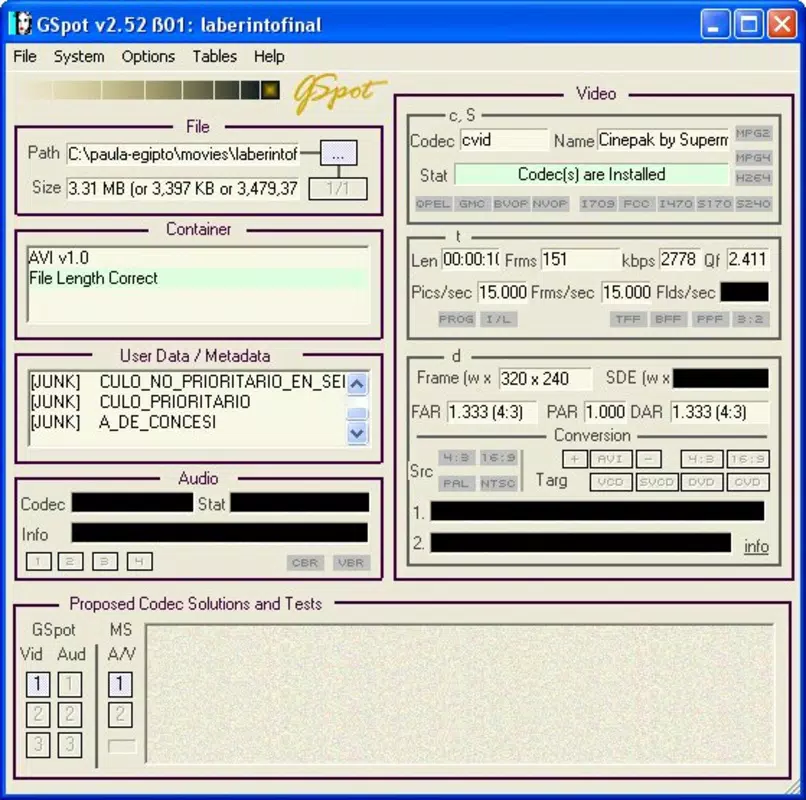
- Detailed Media Specifications: GSpot displays key parameters such as video codec, aspect ratio, duration, and bitrate. These metrics are essential for understanding file compatibility with formats like VCD, SVCD, and others.
- User-Friendly Interface: The application features a clean, straightforward layout that supports easy navigation, making it accessible to users with varying levels of technical expertise.
For example, a video editor working with legacy files can use GSpot to verify if a particular codec is supported by their current software suite. Similarly, a home user experiencing playback issues can use the tool to confirm whether the file is corrupted or requires a specific codec pack. The drag-and-drop functionality ensures minimal learning curve, while the detailed output supports informed decision-making.
Interface, UX & Performance
GSpot presents a minimalistic interface focused on functionality. The layout prioritizes clarity, with essential controls and output panels clearly organized. Users are greeted with a central drop zone for video files, supported by a side panel displaying real-time analysis results. Navigation is straightforward, relying on standard Windows interaction patterns, which contributes to a smooth user experience.
Although the developer did not list formal performance metrics, the application’s lightweight nature—3.5 MB in size—suggests efficient resource usage. It is expected to run smoothly on older and modern Windows systems alike, though specific performance benchmarks were not provided. Responsiveness appears consistent, with quick feedback after file drops, and the interface remains stable during repeated use.
Stability is a notable aspect, given the app’s long-standing presence. The lack of reported crashes or errors in its release history indicates reliable operation. However, compatibility with newer Windows versions may require verification, as the tool was last updated in 2007. Users should exercise caution when running older software on modern systems, especially those with enhanced security restrictions.
Platform Compatibility & Technical Requirements
GSpot is designed for the Windows platform. The application is compatible with Windows operating systems, though specific version requirements were not listed by the developer. Given its release date in 2007, it may function on Windows XP, Vista, 7, and later versions, though official support for newer systems is not confirmed.
The app has a file size of 3.5 MB, making it a compact utility that does not strain storage. No additional dependencies or installation requirements were mentioned. The developer did not specify minimum OS requirements or hardware specifications, so users are advised to test compatibility on their systems before use.
Pros and Cons
Pros
- Lightweight design with minimal system impact
- Simple drag-and-drop interface for fast file analysis
- Provides detailed codec and media file information
- Helps identify file corruption issues
- Free to download and use
Cons
- Outdated release date raises concerns about modern OS compatibility
- No official updates since 2007
- Limited to Windows platform
- Developer did not provide technical specifications or system requirements
- May trigger security warnings on modern systems due to age
FAQ
Is GSpot safe to download and install?
GSpot is a free tool that has been used for over a decade. However, due to its age and lack of recent updates, some antivirus programs may flag it as potentially risky. Users should download from trusted sources and scan the file before installation.
Can I use GSpot on Windows 10 or Windows 11?
While GSpot was released in 2007, it may still run on Windows 10 and 11. However, compatibility is not guaranteed, especially on systems with strict security policies. Testing on a virtual machine or sandboxed environment is recommended.
Does GSpot work on Mac or Linux?
No, the application is designed exclusively for Windows. There is no official version available for macOS or Linux systems.
What should I do if GSpot doesn’t recognize my video file?
If GSpot fails to analyze a file, it could indicate a corrupted file, an unsupported format, or a missing codec. Use the file integrity check feature to verify the file’s condition. If the file is intact, consider installing the appropriate codec pack.
Is GSpot regularly updated?
No updates have been released since 2007. The developer has not announced any plans for future updates, so users should treat the app as a legacy tool with limited ongoing support.
Final Thoughts
GSpot remains a niche but functional tool for users needing to analyze video codecs and verify file integrity. Its straightforward design and free access make it a compelling option for those working with legacy media files or troubleshooting playback issues. While its age presents compatibility risks on modern systems, its core functionality continues to deliver value in specific use cases.
For users managing digital video content on Windows, especially those without access to modern codec analyzers, GSpot offers a reliable, no-frills solution. It is particularly useful for verifying file specifications, identifying missing codecs, and detecting corruption.
Download GSpot now


